 Talk to a Sage Intacct Expert
Design starts with the operating model
Nonprofit & Social Services
Grant and program reportingNonprofit & Social Services
Connect every funding promise to the evidence behind it.
Grants, contribution agreements and donations arrive with different conditions. The finance design decides whether you can show how each dollar was used, by program, fund and period, without rebuilding the answer in spreadsheets.

Agreement, Program, Spend, Allocation, Report
Follow one funding source through the ledger.
Choose a type of funding, then walk it from the agreement to the report. The same five stages apply to every source. What finance must prove changes at each one.
01Agreement Restricted grant
The agreement names eligible costs, the funding period, reporting dates and whether unspent funds must be returned.
What the design needs
Record the grant with its own dimension value, budget and period, so its restrictions live in the ledger, not in a spreadsheet beside it.
02Program Restricted grant
The grant pays for part of one program, alongside other funders.
What the design needs
Keep program and grant separate. A program can draw on several funders, and one grant can support more than one program.
03Spend Restricted grant
Staff time, supplies and a share of rent are incurred.
What the design needs
Code spend to program, grant and expense type at entry, with approvals that test eligibility before the cost is committed.
04Allocation Restricted grant
Rent and a coordinator’s time are shared across programs.
What the design needs
Allocate shared cost with a documented driver, such as floor area or timesheet hours, reviewed before the period closes.
05Report Restricted grant
The funder asks for spending by its own budget lines, not your chart of accounts.
What the design needs
Map the funder’s categories to accounts and dimensions once, and reconcile the report to the ledger every time it is submitted.
01Agreement Reimbursement agreement
Funds arrive after you spend and claim eligible costs.
What the design needs
Track claimable spend and outstanding claims, so cash timing and receivables are visible early.
02Program Reimbursement agreement
Delivery starts before any money arrives.
What the design needs
Budget the program with its expected claims, and watch working capital as closely as the budget.
03Spend Reimbursement agreement
Every eligible cost must be supported for the claim.
What the design needs
Attach support at entry and flag ineligible costs while they are still easy to correct.
04Allocation Reimbursement agreement
The claim may allow a share of administration, up to a limit.
What the design needs
Calculate the allowable share with the agreed method and cap, and keep the calculation reproducible.
05Report Reimbursement agreement
The claim is the report.
What the design needs
Produce the claim from the ledger, and reconcile claimed, approved and received amounts.
01Agreement Unrestricted donation
No conditions beyond good stewardship.
What the design needs
Keep unrestricted revenue apart from restricted funds, so the board sees what is genuinely available.
02Program Unrestricted donation
The board may direct funds to priorities or reserves.
What the design needs
Record board designations separately from donor restrictions. One is an internal decision, the other an external condition.
03Spend Unrestricted donation
These funds often cover what no grant will pay for.
What the design needs
Make the unfunded share of each program visible, so fundraising targets rest on real numbers.
04Allocation Unrestricted donation
Administration and fundraising need a fair share of cost.
What the design needs
Use the same allocation method you use for grants, so the organization tells one consistent story.
05Report Unrestricted donation
Boards and donors want stewardship and impact.
What the design needs
Report by program and by funding type, with unrestricted results beside restricted ones.
Sage Intacct in this operating model
Sage Intacct runs the grant, not only the ledger.
Grant tracking and billing, fund accounting, restrictions, revenue recognition and funder reporting are native Sage Intacct capabilities. Biviti configures them around your agreements, so the evidence builds as the money moves.
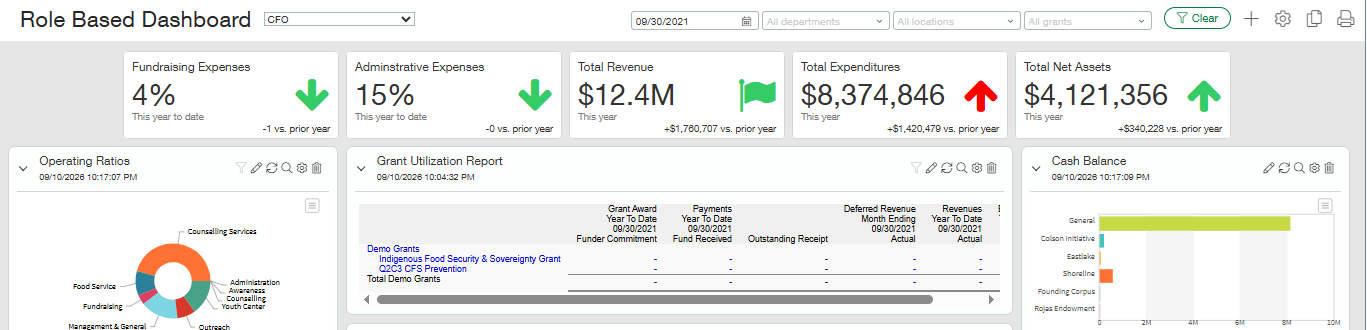
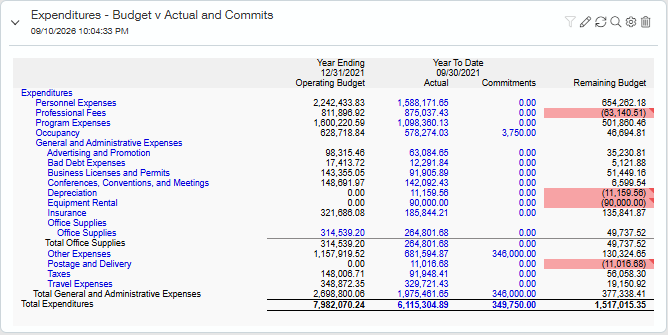
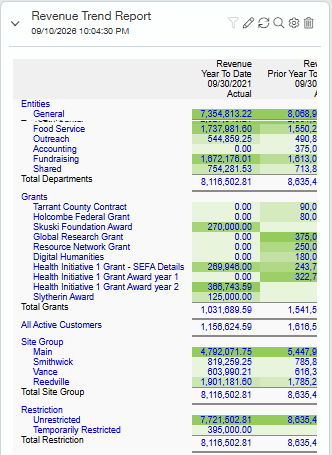
Actual Sage Intacct interface. Demo data shown. It can be customized for your organization.
How the solution fits together
- Configurable sequence
- Foundation, used throughout
- Cross-cutting capability
- Integration boundary
- Reporting and insight
Reporting and insight
Integrations can connect here, and at any point
Grant lifecycle
- 01Award or funding agreement
- 02Budget, restrictions and grant setup
- 03Eligible spend: AP, payroll, allocations
- 04Billing, reimbursement or contribution treatment
- 05Revenue recognition or release
- 06Reconciliation, reporting and close
Branches and loopsAmendments, extensions, reimbursement rejections and returned funds loop back to the budget and restrictions.
Foundation, configured once and used throughout
- Grant tracking and billingAwards, reimbursement claims, billing and audit support managed in Sage Intacct.
- Fund accounting and restrictionsRestricted, unrestricted and board designated funds, with releases from restriction.
- Revenue recognition and deferred revenueContributions and grant revenue recognized and released on the terms of each agreement.
- Spend Management and commitmentsSpending checked against the grant and program budget, including what is already committed.
- AP Automation and approvalsInvoices captured, coded and approved against the grant before they are paid.
- TaxGST/HST and sales tax calculated, with recoverable input tax credits tracked separately where configured.
- Dashboards and PlanningRole-based dashboards for the CFO, program managers and the board; Sage Intacct Planning for budgets and reforecasts (licensed separately).
How Biviti configures it
We map each agreement to grant, fund and program dimensions, set the budget and restriction rules before the first dollar is spent, and configure approvals and allocations so the funder report is produced from the ledger rather than rebuilt beside it.
Explore Sage IntacctA structure that can answer every funder.
Sage Intacct supports multiple entities and standard and custom dimensions. The design work is deciding what each dimension means, who maintains it and which reports depend on it.
- Entity
The legal organization. Where several entities deliver related services, decide which decisions belong to each and which need a combined view.
- Fund
Restricted, unrestricted and board designated resources, each with its own balance.
- Program
What the organization delivers. Programs outlive any single grant.
- Grant
Each agreement, with its period, budget and conditions.
- Location or department
Where the work happens and who manages it.
- Expense type
The funder’s eligible cost categories, mapped to your accounts.
People and time carry most program cost.
For most social service organizations, salaries and benefits are the largest cost, and many staff work across programs and grants. If time is not captured by program, shared cost becomes guesswork and grant reports become hard to defend.
- Timesheets
- Capture hours by program and grant, so payroll can be allocated from real effort.
- Payroll journal
- The payroll system calculates pay. Finance receives a journal coded to program, grant and location.
- Review
- Program managers confirm allocations before the period closes, while corrections are still simple.
- Budget control
- Budget against actuals by grant and program, so overspending is visible before the funder sees it.
The systems around the ledger.
Donor, grant portal and payroll systems capture the specialist activity. Sage Intacct controls the financial workflow, applies the fund, program and grant structure, automates approvals, allocations and close where appropriate, reconciles each feed and turns it into reporting the board and funders can trust.
| System | Its role | In Sage Intacct | Reconciliation |
|---|---|---|---|
| Donor or fundraising system | Donors, pledges, gifts and receipts | Gift revenue by fund and campaign, with contribution accounting | Gifts to deposits and revenue |
| Grant portals and funder systems | Applications, deadlines and funder submissions | Award terms, budgets, periods and restrictions set up in grant tracking | Claims and submissions to the ledger |
| Payroll and time | Pay, hours and employee records | Payroll journals by program and grant, allocated from recorded hours | Payroll totals to the journal |
| Sage Intacct | The financial system of record, and the engine for the grant lifecycle |
| Funder, board and audit reports to the ledger |
- Can you explain the remaining balance of each restricted fund today, without a spreadsheet?
- Which costs are shared across programs, entities or grants, and how are they allocated?
- Do funder reporting periods differ from your fiscal year?
- Who reviews the evidence behind each funder and board report before it is submitted?
- Where do donor, grant and payroll information enter finance, and who reconciles each?
Make funding accountability part of the design.
Talk it through with a Sage Intacct specialist, or start with a short assessment of your requirements.