 Talk to a Sage Intacct Expert
Design starts with the operating model
Nonprofit & Social Services
Grant and program reportingSenior Care & Community Services
Accountability by location, program and funding stream.
Senior care and community services run on people: staff across residences, day programs and home services, paid for by public funding, client fees and fundraising. Finance needs to show each location and program what it earned, what it spent and why.

- 01Funding / Revenue
- 02Location / Program
- 03People & Services
- 04Cost
- 05Accountability
Funding / Revenue, Location / Program, People & Services, Cost, Accountability
One organization, several ways of being paid.
Choose a funding stream. The board shows which kinds of location usually carry it, and what finance must do at each step so every location and program can account for it.
- Residential siteCarries this stream
- Day programCarries this stream
- Home and community servicesCarries this stream
01Funding / Revenue
Funding tied to approved services, usually with a budget and a year-end reconciliation.
02Location / Program
Assigned to the locations and programs named in the agreement.
03People & Services
Staffing levels and service volumes are often what the agreement measures.
04Cost
Payroll, benefits and agency staff dominate. Code them to location and program at the source.
05Accountability
Reconcile funded services and spending to the agreement, and explain any surplus or deficit.
- Residential siteCarries this stream
- Day programCarries this stream
- Home and community servicesNot usually
01Funding / Revenue
Fees billed to clients or residents, sometimes with subsidies or a third-party payer.
02Location / Program
Revenue belongs to the location or service that delivered it.
03People & Services
Service records in the care or scheduling system drive what is billed.
04Cost
Set fee revenue against the staffing and supply cost of the same service.
05Accountability
Location managers see revenue and cost together, not in separate reports.
- Residential siteNot usually
- Day programCarries this stream
- Home and community servicesCarries this stream
01Funding / Revenue
Donations and grants, some restricted to a purpose or a site.
02Location / Program
Restricted gifts follow the location or program the donor chose.
03People & Services
Often funds equipment, activities or programs that no other source covers.
04Cost
Track restricted spending separately, so remaining balances are always known.
05Accountability
Report to donors and the board on how gifts were used.
Typical patterns. Your funding agreements and services decide the real structure.
Payroll is the cost structure.
Staffing is usually the largest cost in care and community services, and it is scheduled by shift, location and program. The design has to carry that detail into finance without copying the scheduling system.
- Scheduling and payroll
- Own shifts, hours, rates and pay. They stay the source of truth for people.
- What finance receives
- Payroll journals by location, program and funding stream, with totals that reconcile to the pay run.
- Shared staff
- Staff who work across sites or programs are allocated from recorded hours, not estimates.
- What leaders watch
- Overtime and agency staffing by location, against budget, before month-end.
MonTueWedThuFriSatSun
Scheduled Agency Overtime
Payroll journal to finance
- Residential siteCare programGovernment funding
- Day programActivitiesClient and resident fees
- Home and community servicesHome supportGovernment funding
- Shared staffAllocated from hoursEach stream it serves
Sage Intacct in this operating model
Locations, programs and staffing cost in one live picture.
Care platforms run the care. Sage Intacct runs the finance around it: location and program accounting, staffing cost against budget, purchasing and AP, funding revenue and the close, with dashboards every location manager can use.
- Location and program dimensionsEvery residence, day program and home service reports revenue, staffing and cost on its own.
- Payroll allocationPayroll journals coded to location, program and funding stream, reconciled to the pay run.
- Purchasing and AP AutomationSupplies and contracted services requested, approved and paid against location budgets.
- Budgets and Spend ManagementLocation and program budgets, with spending checked before it is committed.
- Funding and fee revenueGovernment funding, resident fees and fundraising accounted for by stream.
- Close automation and dashboardsA faster, more consistent month-end, and role-based dashboards for location managers and the board. Sage continues to add close automation.
How Biviti configures it
We design location, program and funding dimensions first, connect payroll and care systems as summarized, reconciled feeds, and set budgets and approvals so each location manager sees revenue, staffing and cost together.
Explore Sage Intacct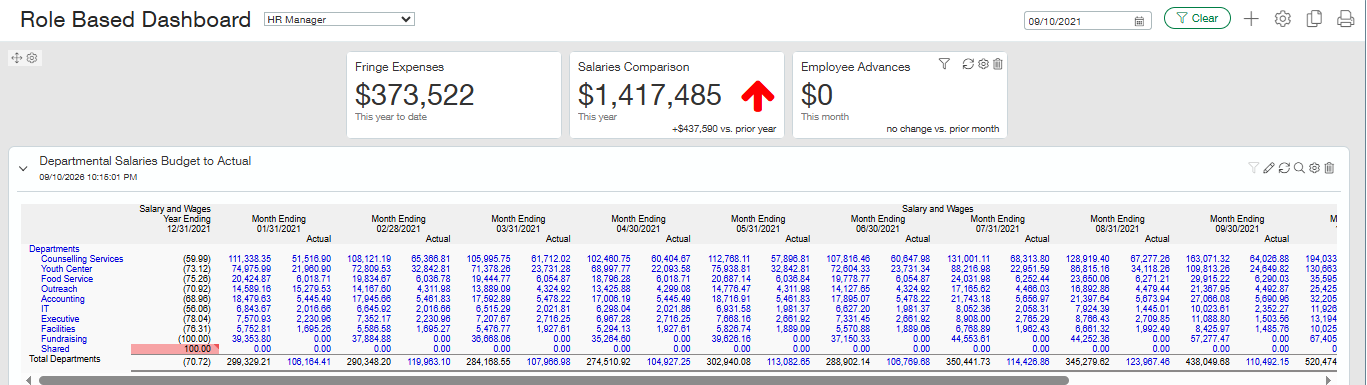
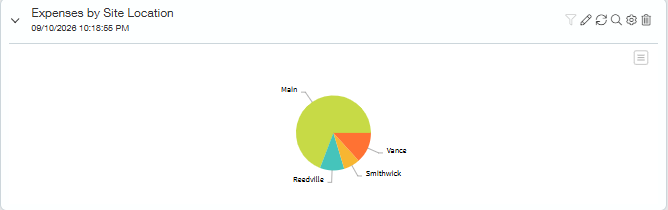

Actual Sage Intacct interface. Demo data shown. It can be customized for your organization.
How the solution fits together
- Foundation, used throughout
- Integration boundary
- Reporting and insight
Foundations
Operational data connects continuously
Integrations can run at any point, and on any schedule.
Finance processes in Sage Intacct
Outputs
Care systems run the care. Sage Intacct runs the finance.
Care and scheduling platforms capture clinical records, visits and shifts. Sage Intacct controls the financial workflow, applies the location, program and funding structure, automates approvals, allocations and close where appropriate, reconciles each summary and turns it into reporting managers, boards and funders trust. Personal health information stays in the care platform.
Care and scheduling platforms capture
- Care plans and clinical records
- Service delivery and visits
- Shifts and staffing
Sage Intacct controls
- Revenue and billing by location and program
- Payroll allocation by funding stream
- Purchasing, AP and approvals against location budgets
- Budgets, close and reporting
What managers, boards and funders need to see
Budgets by location
Each location and program owns a budget, and managers see actuals against it without waiting for month-end packs.
Shared costs
Head office, facilities and information technology are allocated with a method the funders accept.
Approvals
Purchasing and staffing approvals follow the location and program budget, with limits that match delegated authority.
Board and funder reporting
The same ledger produces the board view, the funder reconciliation and the location report.
- How many locations, programs and funding streams does finance report on today?
- Can each location manager see revenue, staffing cost and budget together?
- How are staff who work across sites or programs allocated?
- Which care, scheduling or billing systems feed finance, and who reconciles them?
- Which funding agreements require year-end reconciliation, and how long does it take?
Give every location a clear financial picture.
Talk to a Sage Intacct specialist about your locations, programs and funding streams.